
UniVirStor 4.19.7 Released: Ceph 19.2.6 Security Update and SMB/AD Reliability Improvements | Unified Block, File & S3 Object Storage - Ambedded
UniVirStor 4.19.7 is now generally available. Security is the focus of this release: the underlying Ceph is upgraded to the 19.2.6 security release, which fixes four CVEs, and the CephX keys of cluster services are rotated to the new aes256k key type. The release also adds a full CephX user capability editor and improves the reliability of SMB/Active Directory services, monitoring and alerting, and the system as a whole. Discover Ambedded's Ceph storage appliances and full-stack software. Pre-tuned, web UI, expert support - optimized for AI, cloud, and enterprise workloads.
UniVirStor 4.19.7 Released: Ceph 19.2.6 Security Update and SMB/AD Reliability Improvements
UniVirStor 4.19.7 is now generally available. Security is the focus of this release: the underlying Ceph is upgraded to the 19.2.6 security release, which fixes four CVEs, and the CephX keys of cluster services are rotated to the new aes256k key type. The release also adds a full CephX user capability editor and improves the reliability of SMB/Active Directory services, monitoring and alerting, and the system as a whole.
Fully remediating the CephX authentication bypass CVE-2025-30156 requires clients to support the new key type as well. To avoid disrupting existing clients that still run older Linux kernels, 4.19.7 takes a staged approach to the migration, described in detail below.
Underlying Ceph Upgraded to the 19.2.6 Security Release
On August 19, 2026, the Ceph project released Squid 19.2.6, a security release that fixes four CVEs. The Ceph project strongly recommends that all operators upgrade as soon as possible. UniVirStor 4.19.7 ships with Ceph 19.2.6, so both newly deployed clusters and upgraded existing clusters run this version.
The Four CVEs Fixed in This Release
| CVE | Component | Description | CVSS 3.1 |
|---|---|---|---|
| CVE-2025-30156 | CephX authentication | A flaw in CephX encryption that may allow an attacker to forge credentials and gain administrative access to the cluster | 8.9 (High) |
| CVE-2026-39944 | RGW (STS) | The same class of encryption flaw as CVE-2025-30156, affecting RGW STS session tokens; only clusters with STS enabled are affected | 8.5 (High) |
| CVE-2026-50152 | Ceph Monitor | A user with only read access to the Monitor may read config-key data, which can include sensitive information such as OSD disk encryption keys | 8.2 (High) |
| CVE-2026-54330 | RGW (S3) | RGW does not properly verify S3 SigV4 signatures, so a holder of a presigned URL may gain permissions the signer did not grant | 8.2 (High) |
CVSS scores are taken from the official Ceph security advisory; other vulnerability databases may rate these CVEs slightly differently.
CephX Key Rotation: What 4.19.7 Covers
CVE-2025-30156 cannot be fixed by upgrading alone. Ceph introduces a new key type, aes256k, for this fix (the first time CephX has added a key type), and existing keys must be rotated to the new type to complete the remediation. The 4.19.7 upgrade procedure includes key rotation, with the following scope:
| Key | Handling in 4.19.7 | Notes |
|---|---|---|
| Ceph service keys (MON, MGR, MDS, OSD) | Rotated to aes256k | For OSDs with disk encryption (LUKS), the keys used to unlock them are updated as well |
| Service-owned client keys (bootstrap, crash, NFS, and others) | Rotated to aes256k | Used by system services; customer clients are not affected |
| client.admin | Temporarily kept as aes | Many existing clients mount with this key; see the explanation below |
| Key types allowed by the cluster | aes and aes256k both allowed | Clients that do not yet support aes256k can continue to connect |
Why client.admin Temporarily Keeps the Older Key Type
Clients that mount CephFS or RBD through the Linux kernel (kernel clients) need Linux kernel 7.0 or later to support aes256k, and the kernels shipped by most distributions used in enterprise environments do not support it yet; the default Ubuntu 22.04 kernel is one example. Rotating client.admin to aes256k now, or disabling the older aes type, would immediately prevent these clients from mounting and interrupt service.
4.19.7 therefore migrates in stages: key rotation on the cluster service side is completed now, while rotating client.admin and disabling the older key type wait until client kernels have been upgraded. Until then, existing clients continue to work as before, with no need for an immediate kernel upgrade.
Full remediation of CVE-2025-30156 ultimately requires every client to support aes256k. We recommend starting to inventory the hosts that mount CephFS or RBD through the kernel and planning kernel upgrades; once that is done, Ambedded support is happy to work out a client key migration schedule with you.
How the Upgrade Works
4.19.7 is installed with an update package. Hosts are upgraded and their keys rotated one at a time, and the cluster health is confirmed after each host before moving on to the next. Ceph services restart in turn during the upgrade, so we recommend scheduling it within a maintenance window. Existing customers can contact Ambedded support to receive the update package and upgrade guidance.
Full CephX User Capability Management in the Web UI
Previously, CephX user capabilities in UVS Manager could only be set for OSDs. Setting MON, MGR, or MDS capabilities at the same time, or using Ceph's built-in profiles, required the command line. 4.19.7 introduces a redesigned capability editor.
Separate Settings for Four Service Types
When creating or editing a CephX user, you can set capabilities separately for mon, mgr, osd, and mds, and leave any type you do not need empty. A new user can also be created without any capabilities and have them added later.
Profiles and Advanced Parameters
In addition to allow r/w/x combinations, Ceph's built-in profiles are supported, along with parameters such as pool, namespace, and path. Common examples:
| Use case | Example capabilities |
|---|---|
| RBD client | mon 'profile rbd', osd 'profile rbd pool=<pool>' |
| Read-only RBD client | mon 'profile rbd', osd 'profile rbd-read-only pool=<pool>' |
| CephFS client (restricted to a directory) | mon 'allow r', mds 'allow rw path=/<dir>', osd 'allow rw tag cephfs data=<fs>' |
Existing Settings Fully Preserved When Editing
When you edit an existing user, the editor loads all of its current capabilities, including profiles and their pool, namespace, and path parameters, without truncating or dropping anything outside the OSD settings.
More Accurate Management and Monitoring
Faster CephFS Pages
The CephFS management page now uses a more efficient data source. Volumes, subvolume groups, and subvolumes share one set of data instead of querying repeatedly, so the page loads faster in environments with many subvolumes.
Disk Capacity in the Drive Position Panel
The disk panel in Server Hard Drive Position Settings now shows each disk's capacity alongside its serial number, making it easier to verify the drive layout. When the capacity cannot be read, the panel shows "-" rather than a misleading 0.
More Reliable CRUSH and iSCSI Settings
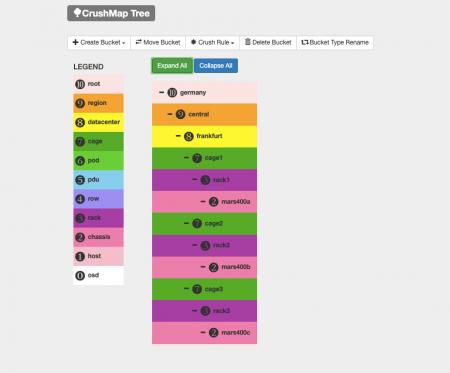
If an error occurs while renaming a CRUSH bucket type, the UI now correctly reports the failure instead of reporting success, and names are restricted to letters, digits, underscores, and hyphens. The iSCSI IQN Base Prefix is now validated and no longer accepts uppercase letters, so problems are caught before a target is created.
More Accurate Samba Alerts
The metric that tracks Samba service readiness could previously get stuck on an abnormal value when a system component stopped responding, and would not update after the service recovered. 4.19.7 adds timeouts to these checks, so the metric returns to normal at the next check after recovery. The SambaExporterDown alert is fixed as well: clusters without Samba no longer receive constant false alarms, and the alert now fires correctly when the Samba container stops.
More Efficient Alert Notification Handling
When an alert arrives, the system no longer makes an extra Prometheus query to look up rule details, and when email notification is disabled, the rest of the processing is skipped. This reduces system load when many alerts fire at once.
Improved SMB and Active Directory Reliability
4.19.7 includes a series of fixes for SMB service stability in Active Directory environments, focused on keeping brief glitches from turning into service outages.
Global Settings No Longer Overwritten Automatically
Previously, the global settings of a Samba cluster could be written back automatically by each node's periodic synchronization, not just changed by an administrator. If a brief connection problem occurred while the settings were being read, the system could treat them as "not yet configured" and reset them to defaults, causing a domain-joined cluster to fall back to a workgroup, breaking AD authentication, and losing custom global parameters. From 4.19.7 on, global settings are written only when an administrator explicitly changes them, such as joining or leaving AD or adding a custom parameter. If the settings cannot be read, that synchronization round is skipped and retried in the next round.
More Reliable Domain Join
When AD is enabled on a newly created Samba cluster and the trust relationship check fails after joining the domain, the system now retries immediately within the same round, up to three times, instead of waiting passively for the next synchronization round. If the domain controller appears to be temporarily unreachable, the node does not rejoin repeatedly, which protects the trust relationships of the other nodes.
Lower Background Load on Ceph
Samba's per-minute configuration synchronization now reads the complete configuration once per round instead of querying each item repeatedly, greatly reducing the constant background queries sent to Ceph. Sensitive values in the configuration, such as the AD administrator password, remain encrypted.
Fix for Multiple VIPs
Fixed an issue where, with two or more Samba VIPs configured, the same VIP was written more than once during initialization.
Stability and Security Hardening
A More Robust Management Database
The UVS management database (MariaDB Galera Cluster) now starts correctly when there is no existing cluster state, and when the database is temporarily unavailable, the scheduled report check no longer prevents the background job queue from starting. Database synchronization across nodes has also been made more robust: if the UVS Manager database becomes inconsistent between nodes because of a hardware issue, the system repairs it automatically.
Deployment and Day-to-Day Operation Fixes
Clusters can now be created when host names include a domain (FQDN, for example uvs101.example.com). Other fixes cover the SNMP service failing to start, the Update page failing to upload update packages, the "How to mount" function of a subvolume failing to create the default user, and the daily performance monitoring (PCP) job failing repeatedly after a host name change.
Security Hardening
File uploads in the Web UI now actually filter out disallowed file extensions rather than only hinting at them. PHP is upgraded to 8.4.25, and unused packages have been upgraded or removed.
Frequently Asked Questions
▾What are the main updates in UniVirStor 4.19.7?
Security is the focus of this release: the underlying Ceph is upgraded to the 19.2.6 security release, which fixes four CVEs, and the CephX keys of cluster services are rotated to the new aes256k key type. The release also adds a full CephX user capability editor and improves SMB/Active Directory reliability and the accuracy of monitoring and alerts.
▾Is CVE-2025-30156 fully remediated after upgrading to 4.19.7?
Not completely yet. 4.19.7 upgrades Ceph to the fixed version and rotates the MON, MGR, MDS, and OSD service keys, together with service-owned client keys, to aes256k. To avoid disrupting clients that still run older kernels, client.admin temporarily keeps the older aes key type, and the cluster still allows aes. Remediation is complete once every client supports aes256k, client keys have been migrated, and aes has been disabled.
▾Do my clients need to be upgraded right away?
No. Existing clients can continue to connect and mount as before. To migrate to aes256k, hosts that mount CephFS or RBD through the Linux kernel need Linux kernel 7.0 or later, and hosts that use Ceph client programs or libraries (such as ceph-fuse or librados) need Ceph 19.2.6 or later. We recommend taking inventory and planning these upgrades.
▾What can I configure in the CephX user capability editor?
You can set capabilities separately for mon, mgr, osd, and mds, using allow r/w/x combinations or Ceph's built-in profiles (such as profile rbd and profile rbd-read-only), with parameters such as pool, namespace, and path. When you edit an existing user, all of its current settings are loaded.
▾Will upgrading to 4.19.7 interrupt service?
The upgrade proceeds one host at a time, and the cluster health is confirmed after each host before moving to the next; Ceph services restart in turn. We recommend scheduling the upgrade within a maintenance window with the help of Ambedded support.
Upgrade and Support
That covers the updates in UniVirStor 4.19.7. Because this release contains important Ceph security fixes, we recommend that all customers plan an upgrade soon and, at the same time, take inventory of clients that mount CephFS or RBD through the Linux kernel to prepare for the upcoming key migration.
Existing customers can contact Ambedded support to receive the update package and upgrade guidance. To discuss an upgrade plan or learn more about any capability in this release, please get in touch, email service@ambedded.com.tw, or visit the UniVirStor enterprise Ceph software-defined storage product page.
About Ambedded Technology
Founded in 2013, Ambedded Technology is a technology provider specializing in Ceph software-defined storage. Combining deep knowledge of open source software, Ceph distributed storage, embedded Linux, and Arm-based architecture, Ambedded delivers Ceph storage solutions ranging from software-only to turnkey appliances, together with Ceph consulting, professional services, and seamless updates — helping enterprises, government agencies, and academic institutions build scalable, highly reliable storage infrastructure at a lower total cost of ownership.
- Related Products
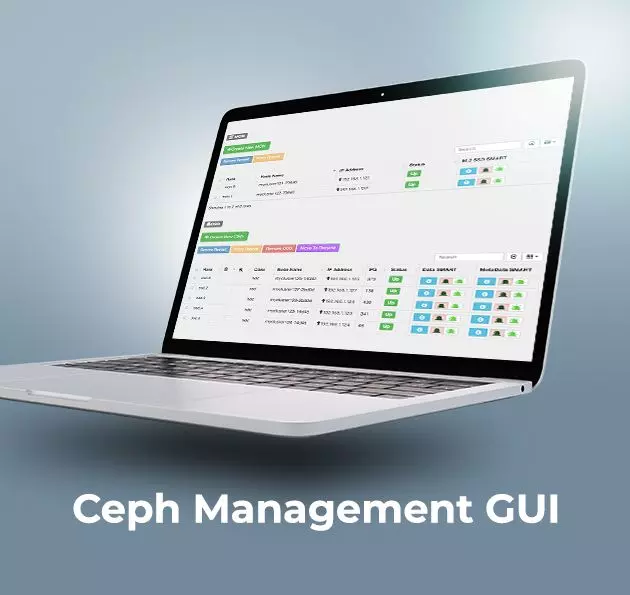
Ceph Management Web User Interface (UVS Manager)
Unified Virtual Storage (UVS) is a software package that integrates Linux operating system, Ceph distributed storage software, management console, and the web-based...
Details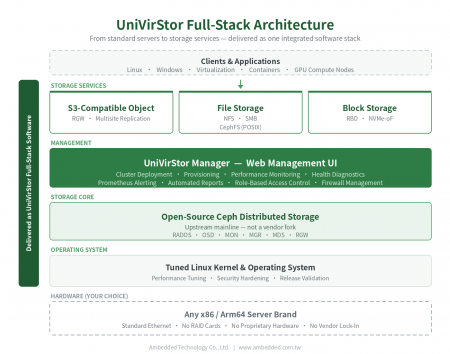
UniVirStor Enterprise Ceph Software-Defined Storage
UniVirStor is Ambedded's full-stack enterprise Ceph software-defined storage. It integrates a tuned Linux kernel and operating system, Ceph storage software,...
Details
Hot Products
 Download
 UniVirStor 4.19.7 Released: Ceph 19.2.6 Security Update and SMB/AD Reliability Improvements | Ceph Storage Solutions; Ceph Appliances & Software|Ambedded
Founded in Taiwan in 2013, Ambedded Technology Co., Ltd. is a leading provider of block, file, and object storage solutions based on Ceph software-defined storage. We specialize in delivering high-efficiency, scalable storage systems for data centers, enterprises, and research institutions. Our offerings include Ceph-based storage appliances, server integration, storage optimization, and cost-effective Ceph deployment with simplified management.
Ambedded provides turnkey Ceph storage appliances and full-stack Ceph software solutions tailored for B2B organizations. Our Ceph storage platform supports unified block, file (NFS, SMB, CephFS), and S3-compatible object storage, reducing total cost of ownership (TCO) while improving reliability and scalability. With integrated Ceph tuning, intuitive web UI, and automation tools, we help customers achieve high-performance storage for AI, HPC, and cloud workloads.
With over 20 years of experience in enterprise IT and more than a decade in Ceph storage deployment, Ambedded has delivered 200+ successful projects globally. We offer expert consulting, cluster design, deployment support, and ongoing maintenance. Our commitment to professional Ceph support and seamless integration ensures that customers get the most from their Ceph-based storage infrastructure — at scale, with speed, and within budget.